Search This Blog

Showing posts with label Web Development. Show all posts

Friday, 12 July 2013

How to Charge For Web Design Work – 7 Tips and Strategies

Knowing how much to charge your clients can be really hard if you are a freelancer and especially if you are inexperienced. Setting the price too low may show that you don’t value your work very much and also you won’t feel motivated to create beautiful projects. Also, a very high price means that you may lose clients or have less than usual, and thus, financial problems may appear.


We’ve done some research for you and found out what are the best pricing strategies and tips for you to apply on your projects. Hope they will help you earn more and have more clients!


Charge Clients According to Their Value


For example, if you are asked to create a 10-page website for two different clients, would you charge them the same amount of money? Well, if you think that the amount of work and time spent is the same, you may tend to charge them the same; but it is very important to also consider how important is the website for your client. If website you create will be non-profit or if it will bring a significant amount of monthly profit to your client, are two things that define the value of a website. So, if the website you design is for an important client/company, charge more!


Give Your Client Multiple Options


When creating the price offer always give your client multiple options. For example, you can create ‘packages’: website design + website development = Price 1 | website design + website development + SEO = Price 2, and so on. This way your client will choose the option that suits him best. You can also include offers and discounts for larger packages, in order to make the client choose the most expensive option.


Bundle your fees


When creating the price offer for your client, tell him exactly what services he will receive and at the end of the offer specify the final price with discounts, if any. A well structured price offer is very important in this business.


Emphasize on Time Saving


The lowest price isn’t always the winning choice when it comes to selling products and services. Most of the time, the deadlines are just as important. Emphasize on the fact that you never missed a deadline and also that you’ll manage to finish the project in a short amount of time.


Create a High Quality Portfolio


Experience is one of the most important elements of defining a project’s price. As you’ll get more experienced in this domain, you’ll also attract better clients with higher funds and get to work on bigger projects. Once you’ve created a high quality portfolio, you can start charging more for your work.


Choose Your Words Wisely


When creating a price offer, the way you write it is very important. Some apparently insignificant words can make a huge difference! Words like “small”, “low” before price/fee/money have a great psychological impact on your clients.


Don’t Decrease Your Price


Once you’ve set up a fee for the project, don’t decrease it just because the client think it may be too much. This shows lack of confidence and the inability of valuing your own work. Yes, sometimes you may lose clients because of this but you should think that it is better this way. The client most likely wasn’t suited for you. You also have the right to pick your clients, not only just the other way around.


To sum up, here’s a great infographic which will help you better understand the techniques to land more clients with persuasive fees:


pricing technique freelancers infographic


Tuesday, 9 July 2013

20 Really Helpful Infographics and Cheats for Designers

We’ve compiled a list with 20 infographics and cheatsheets to help you be mre productive in your design process. From Adobe keyboard shortcuts cheatsheets, to typography and logo infographics, these will surely help you get better at what you do. Learn what makes up a great logo, how to combine colors, use Photoshop shortcuts and more, with these awesome and useful infographics!


Want more? Check out these 8 Tools for Creating Beautiful Infographics, 10 Great Tips For Effective Infographics and 10 Creative and Useful HTML5 Infographics.


iOS and Android Design Cheatsheet


Helpful Infographics and Cheats for Designers ios cheatsheet


In order to make app designing a lot easier, the guys from Kinvey made this very useful cheatsheet for both iOS and Android. Check out the full infographic on their website.


The Psychology of Color


Helpful Infographics and Cheats for Designers colors


A very important element which is also commonly overlooked by some designers, is the influence of colors on a website’s visitors. Learn more by checking out this infographic.


Color Emotion Guide


Helpful Infographics and Cheats for Designers logo colors


When designing a logo for your business, it is very important to take into account the way people react to the color. Find out what kind of emotions will your logo inspire.


RGB vs CMYK


Helpful Infographics and Cheats for Designers rgb vs cmyk


CardPrinting.us presents an infographic weighing the pros and cons of using both RGB versus CMYK color codes in the printing process.


Flyer Size Guide


Helpful Infographics and Cheats for Designers flyer size guide


This is a very useful cheatsheet for print designers. Print it and stick it to your desk wall.


Paper Sizes In Graphic Design


Helpful Infographics and Cheats for Designers paper dimensions


Find out all about paper sizes in graphic design. Very useful for beginners and it is also free to download!


How To Design A Unique And Unforgettable Logo


Helpful Infographics and Cheats for Designers logo


Great infographic which shows you the main principles of designing a creative, unique logo. Useful for graphic designers!


Top 10 Fonts Web Designers Love


Helpful Infographics and Cheats for Designers fonts


Beginner? Find out what are the top 10 fonts web designers love most and why! Learn how to choose beautiful, high quality fonts for your website design project.


Typography Infographic


Helpful Infographics and Cheats for Designers typography


CreativeMarket brings the typographic history, usage & character to life! This infograhic shows the great history of typography. It’s helpful for beginner print and graphic designers!


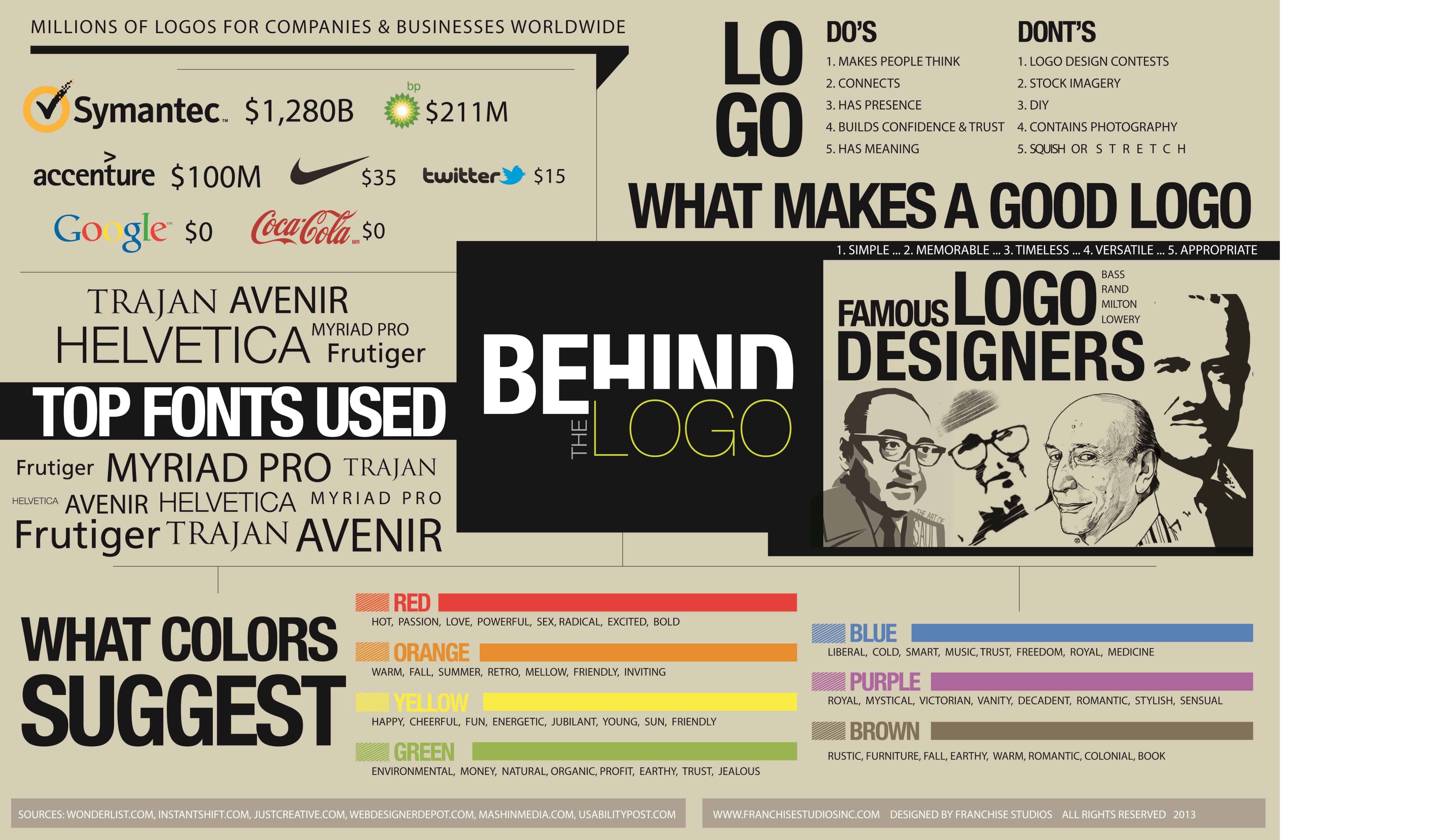
What Makes A Good Logo


Helpful Infographics and Cheats for Designers good logo


In this infographic you’ll see how famous logos were analyzed in order to discover what makes a good logo? Color, fonts..? Find out!


Elements of Design 


Helpful Infographics and Cheats for Designers elements of design


Discover what are the elements of design with this cool infographic, which also has downloadable .jpg and .eps files!


Principles of Design


Helpful Infographics and Cheats for Designers principles of design


Print-ready principles of design infographic which comes in two color choices, light and dark!


Adobe Flash Keyboard Shortcuts


Helpful Infographics and Cheats for Designers flash


Become more productive by using these awesome Flash keyboard shortcuts!


Illustrator Keyboard Shortcuts


Helpful Infographics and Cheats for Designers illustrator shortkeys


Want to know all the shortcuts in Illustrator? Learn to use them with this awesome cheatsheet!


InDesign Keyboard Shortcuts


Helpful Infographics and Cheats for Designers indesign shortkeys


Save time by using these cool Indesign keyboard shortcuts. Projects will become a lot easier now!


InDesign CS6 Tools Panel Cheatsheet


Helpful Infographics and Cheats for Designers indesign


New to Indesign? Get a quick introduction to its tools panel with this cheatsheet.


 Pen Tool Technique


Helpful Infographics and Cheats for Designers pen tool technique


Using pen tool can be a little difficult for beginner designers. Learn how to use it properly with this great Adobe cheatsheet!


Photoshop CS6 Keyboard Shortcuts Cheatsheet


Helpful Infographics and Cheats for Designers photoshop keyboard shortcuts


So useful! The best PS keyboard shortcuts for faster work, delivered in a nice, creative format!


Photoshop CS6 Brush Guide


Helpful Infographics and Cheats for Designers photoshop


Learn all about Photoshop CS6 brushes, with this helpful cheatsheet.


Friday, 5 July 2013

The 10 Design Commandments

So what are the rules of good design? Well depending on who you talk to these will change. Different designers will always have their own set of best practices. However, I think it’s a good idea to have 10 basic principles we can all agree on- a designers 10 commandments, if you will. So lets carve up our own list and bring it down from Mount Adobe. Ok it’s time to start parting with bad design:


1. Thou shalt have no end to learning. So you have your degree and you think you are done learning, nothing could be more wrong. As a designer you have to understand that ever changing nature of this business. There will always be new techniques, new software and constant changing industry trends. Join design communities, do tutorials, attend design conferences, follow design blogs & design professionals, post your work to online sites to get feedback or take an online class. Chances are what you learned in school will be outdated after the first year. You have to have the passion and the drive to make sure you are staying in the industry loop.


2. Thou shalt not use any pixelated or stretched image. First of all you should always be using the highest quality images possible. Nothing can ruin a good design quicker than a blurry or pixelated image. Take the time to either take an photograph or buy stock photos. Understand resolution and image sizes. But perhaps the golden rule of working with images is-DO NOT STRETCH YOUR IMAGES. Found a image but you need to stretch it to fit, put the transform tool down and walk away. If you are resizing-HOLD SHIFT!


3. Thou shalt not take the name of the client in vain. As a designer you will always be working for someone else. Make sure you listen carefully to the clients wants and needs. Learn to work within the client’s specifications and budget constraints. Does this mean you can’t suggest ideas or suggestions? Of course not, but do it in a helpful and non-condescending manner. Remember they are hiring you for your knowledge & expertise but it’s also their company, be respectful of their vision & goals. Unless you can sign your own paycheck accept that you are a commercial artist and that means, check your ego at the door.


4. Remember the deadline and keep it holy. Working within deadlines is essential for any successful designer. Be realistic. Don’t say you can deliver something in a time frame you can’t. Being able to meet deadlines shows you can manage your time and that you are respectful of a clients or agencies time. Plus if you can establish yourself as trustworthy and can work within multiple deadlines, the more likely you are to advance in your career.


5. Honour thy spell check. You think because you are a designer you don’t need good verbal or written skills, wrong! A spelling mistake is a great way to make your design look amateurish. Use spell check religiously. Have fellow designers or other professionals look over your work before submitting it. Double check the spelling of names and places. Do not rely on the client proofing it before it goes out into the world.


6. Thou shalt not over-kill. You do not need to show everything you can do in one project (I’m talking to you drop shadow, outer glow, gradient and lens flare lovers out there) Showing restraint and an editing eye is truly a mark of a great designer. I used to tell my students “if you emphasize everything, you emphasize nothing.” Pick one part of your design to stand out. One truly interesting element is all you need to create for a design to memorable.


7. Thou shalt not commit adultery. Stop cheating on programs with others. Use the appropriate programs for the appropriate project. Don’t use Photoshop to design a 12 page booklet or to design a logo. Don’t be afraid to work outside your preferred program to gain the best results for the project.


8. Thou shalt not steal or copy. Great designers are creative and have no need to steal or copy others’ ideas or designs. There is a lot of information out there to how much you can alter an image before it no longer falls under copyright. Also the lines are blurred between what is “being inspired by” and “copying it.” Instead of getting into the do’s and don’ts of copyright and creative commons, I will just leave you with my opinion. A great designer has to find their own unique and distinct style. Also reputation in this business is huge and you don’t want to get known as the designer who’s work has copied someone else’s. So feel free to get inspired but no five finger discount.


9. Thou shalt not bear false qualifications or expectations to your audience. Don’t know how to to do something? Don’t lie and say you can. Lying or exaggerating to get a job will always come back to haunt you. Plus, why would you want a job that you can’t do? This commandment also includes giving clients unrealistic expectations. Don’t promise a 90% increase in website traffic unless you know you can deliver. Wouldn’t you rather have your client pleasantly surprised than disappointed. This however does not mean to downplay your talents or abilities, just keep it rooted in reality. 


10. Thou shalt not covet over used fonts. A list of design rules would not be complete without talking about the fonts that make graphic designers cringe. Those fonts that can literally drive a designer to tears. First off remember when choosing any font the first rule should be READABILITY!! I don’t care how cool the font is, if no one can read it-what’s the point? And then there are those fonts that every inexperienced designer and unknowing client loves to use. Some of the top offenders: Comic Sans, Papyrus, Algerian, Curlz, Cooperplate, Brush Script, Navoo, Bradley Hand, Dark Crystal and Bleeding Cowboys. Another good rule is not to use any fonts associated with a big brand; if people look at your design and associate it with another brand, you have failed in that design. Also you don’t have to beat a dead horse. For example; if you are doing a billboard for a florist, your fonts don’t need to be made out of flowers or vines.


So now that you have your commandments let’s keep from sinning against good design.


Friday, 28 June 2013

Yeti Sighting: 20 Examples of Yeti’s in Web Design

Who doesn’t love yeti’s? This illusive, mythical creature has been in movies, TV, books and other media for years. But in recent years we have noticed more and more that they are popping up in web design. Whether they are being used as a mascot, the design itself or in the background imagery. So I have put on my yeti tracking gear and gathered 20 examples of yeti’s being used in web design!


1. Yeti: mobile, social & web


Screen Shot 2013-06-27 at 10.38.09 AM


2. Yeti Media


Screen Shot 2013-06-27 at 10.50.23 AM


3. Adopt a Yeti


Screen Shot 2013-06-27 at 10.56.20 AM


Did I mention you can make your own yeti & share it with your friends? How awesome is that!


4. Foundation by ZURB


Screen Shot 2013-06-27 at 11.10.07 AM


5. Done it Yeti


Screen Shot 2013-06-27 at 11.14.56 AM


6. Converge


Converge


Technically a Bigfoot but it’s in the snow so I’m saying it’s a yeti.


7. Preparis


Preparis


8. Class Realm


Class realm


9. Yeti Park


Yeti Park


I would take up skiing if I got to meet a yeti.


10. Ski Utah


Ski utah


11. Great Divide


Great Divide


12. Blue Mic


Blue Mic Yeti


13. Snow Safe


16. Hello Yeti.


Hello Yeti


Kind of scary but maybe he’s just misunderstood.


17. 344


Stefan G. Bucher


One of my favorite artists is Stefan Bucher so when he designed a yeti for Saks Fifth Avenue I couldn’t have been happier.


18. The Awkward Yeti


The Awkward Yeti


19. Yeti Frozen Custard


Yeti Custard


20. Mr. Yeti Slushy


Mr Yeti Slushy


Got any more yeti’s to add to the list? Share in the comments below!